
µTorrent®- Torrent Downloader
bittorrent.comVideo Players & Editors
4.6151.04K Reviews
- Version
- 8.3.20
- Installs
- 100.00M
- Age Rating
- Everyone
Screenshots
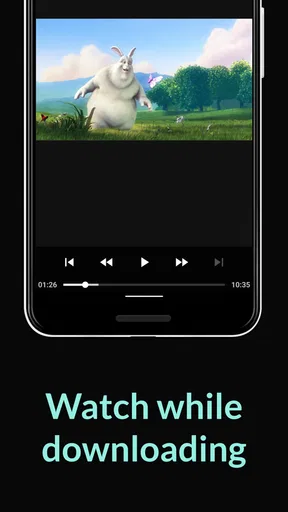
Our Review of µTorrent®- Torrent Downloader
 Analysis by Appyee
My first impression of µTorrent®- Torrent Downloader is that it puts a familiar desktop-style task on a phone without making every control feel like a technical obstacle. That convenience is most valuable when I already have a legitimate torrent or magnet link and want to manage it away from a computer. It is less compelling if I expect a streaming service, a place to discover licensed entertainment, or a way around the usual responsibilities of downloading files.
The first week: convenient, with a learning curve in the details
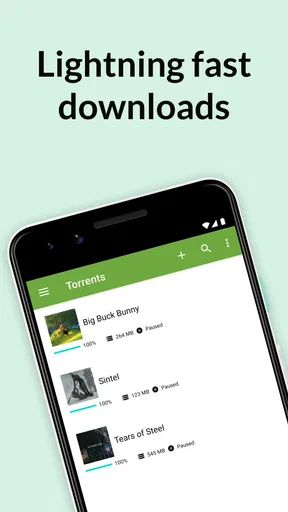
The basic appeal is easy to understand: add a torrent or magnet link, watch its progress, and decide what should download first. For a new user, the useful shift is thinking of the app as a download manager for torrent tasks, not as a search engine or a catalogue of content. Having a link ready before opening the app makes the process clearer and helps avoid treating random results from elsewhere as trustworthy.
During an ordinary day, I might receive a permitted project bundle while away from home and add it to the queue, then leave the phone on Wi-Fi while it transfers. That is where mobile access earns its keep: I can check progress without starting a laptop just to handle one download. But a phone is still a phone. A large transfer can take time, occupy storage, and compete with other uses of the device, so I would not start one casually when I need the handset for calls, navigation, or work.
A practical first-run habit is to look at the file list before starting a bundle. If a torrent contains several items and I only need one, selecting only that item can save space and avoid a cleanup job later. I would also check the destination and available room on the device before committing to a large transfer. These small checks matter more on mobile, where free storage is often shared with photos, offline media, and apps.
Your Pocket-Sized Torrent Powerhouse
First things first, µTorrent®- Torrent Downloader is like having a mini torrent wizard right in your pocket. You can download torrents directly to your phone, which is super handy if you're always on the go and don't want to lug around a laptop. The app itself is pretty lightweight, so it won't eat up all your storage space—nobody wants that, right?
Simplicity at Its Finest
What I love about this app is its simplicity. The user interface is clean and intuitive, meaning you don't need to be a tech guru to navigate through it. Just open the app, search for your desired torrent, and start downloading. It's as easy as pie. Plus, the app supports magnet links, which makes the whole process even smoother.
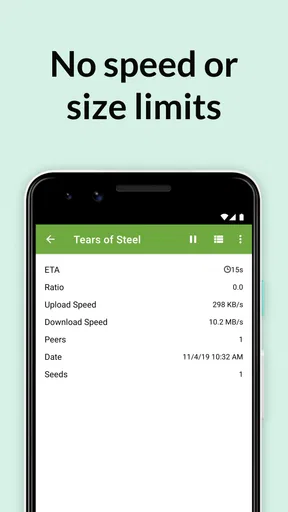
Once your download kicks off, you can track the progress right from the app. It shows you all the nitty-gritty details like download speed, seeds, peers, and estimated time of arrival. And let's not forget, you can prioritize downloads too. Got a file you need pronto? Just bump it to the top of the list.
Features Worth Noting
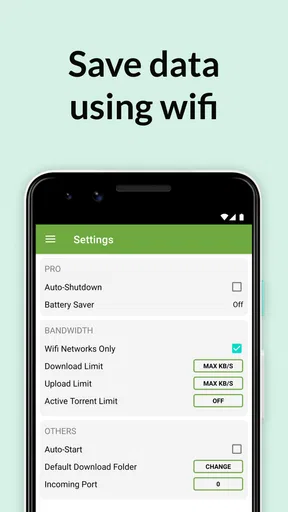
Now, let's talk features. One standout is the ability to set your own download and upload limits. This is a lifesaver if you're working with limited data or trying to conserve bandwidth. You can also select specific files within a torrent to download, which is perfect if you’re only interested in certain parts of a bundle.
Another cool feature is the Wi-Fi-only mode. This ensures that your torrents only download when you're connected to Wi-Fi, saving your mobile data for those important cat memes and Instagram stories.
Keeping routine transfers manageable
Limits and Wi-Fi-only settings are more than setup conveniences; they help make recurring use predictable. If a transfer is not urgent, I would cap its activity or wait until Wi-Fi rather than let it compete with everyday browsing. When a file matters more, prioritizing it is useful, but I would avoid repeatedly rearranging a long queue: the best routine is to start only what I actually need and let the app handle a manageable set of tasks.
There is also a trade-off between getting a file quickly and sharing fairly. Torrent transfers involve both downloading and uploading, so upload limits can help protect a busy or constrained connection, but setting them too aggressively may affect how the task behaves. I treat those controls as a way to balance use with my connection, not as a promise that every transfer will finish at a particular time.
Privacy and Security
Alright, let's address the elephant in the room—privacy. We all know torrenting can be a bit of a grey area, so it's important to stay safe. µTorrent offers encryption protocols to help keep your downloads under wraps. But remember, always use torrents responsibly and ensure you’re not downloading copyrighted material without permission.
Encryption should not be mistaken for anonymity or a guarantee that a file is safe. I would check that a torrent comes from a source I trust, confirm that I have the right to download and use its contents, and be cautious about opening unfamiliar files. The app can manage a transfer, but it cannot make a questionable source legitimate or remove the need for sensible security habits.
Where it fits among mobile alternatives
Compared with ordinary download managers, this app is specifically useful when the source is a torrent or magnet link; a standard browser download workflow is usually simpler for a direct file link. Compared with streaming apps, it is a different kind of tool altogether: it transfers files you select rather than offering an instant, licensed media library. If my goal is simply to watch a show or listen to music, a legitimate streaming service is usually the easier and clearer choice.
It also makes less sense than using a computer when I need to manage many large files, keep a transfer running as part of a desktop workflow, or review files on a larger screen. The phone version is best for occasional, deliberate tasks and checking a queue on the move. That distinction helps set expectations: mobile convenience is real, but it does not turn a handset into an ideal all-purpose archive or workstation.
Advertisements and Premium Options
One thing you'll notice is the presence of ads. They're not too intrusive, but if you're someone who prefers an ad-free experience, you might want to consider upgrading to the premium version. The premium option is pretty affordable and offers perks like no ads, battery saver, and automatic shutdown when downloads are complete.
The app is free to use, while in-app purchases are offered at $2.99 per item. I would decide whether the paid option is worthwhile only after using the free experience long enough to know how often I rely on it. If I rarely download torrents, occasional ads may be an acceptable exchange; if I use it regularly and those interruptions bother me, the listed premium benefits may be more relevant. Either way, I would treat battery-saving or shutdown conveniences as quality-of-life extras, not reasons to download more than I need.
Month-to-month value and maintenance
After the novelty of starting a first transfer wears off, the lasting value comes down to whether torrent downloads are part of my routine. Someone who regularly receives legitimate large files may appreciate having the queue, file selection, and connection controls on hand. Someone who only needs a direct download now and then may find a browser or conventional download manager less fussy. I would not keep it installed just because it can do something interesting; I would keep it if I repeatedly use that specific workflow.
Maintenance is mostly a matter of attention rather than complicated upkeep. I would clear completed files once I have used them, keep an eye on free storage, and remove stalled or unwanted tasks instead of letting a queue become a forgotten list. It is also worth checking the selected files before leaving a transfer unattended. These habits reduce the chance that an old download quietly occupies room needed for new photos or other everyday tasks.
For a long-running transfer, I would check progress before assuming something is wrong. Speed and completion estimates can change as peers and network conditions change, so an estimate is a guide, not a deadline. If a transfer is not moving as expected, reviewing its status and connection conditions is more useful than repeatedly restarting it without a reason. That measured approach is especially helpful when the file is large or the connection is shared.
Sources of fatigue and who should skip it
The main friction is that torrents demand more judgment than tapping a direct download button. I need to think about the source, the rights attached to the content, the files included, storage, and whether my connection can handle the activity. Ads can also become more noticeable with frequent use, while a busy queue and unfinished downloads can make the app feel like another chore rather than a convenience.
I would skip it if I want instant entertainment, prefer not to manage files, or do not want to think about upload activity and storage. I would also avoid relying on it for sensitive or work-critical material from an unfamiliar source. In those situations, a trusted direct-download route, an approved workplace sharing method, or a licensed streaming service is the better fit. The app is most comfortable when the user already understands why a torrent is appropriate and has a clear plan for the downloaded files.
For someone new to torrents, the simplest safe workflow is to start with a small, clearly legitimate file, use Wi-Fi-only mode if mobile data is a concern, inspect the included files, and watch the queue rather than assuming every transfer is set-and-forget. If a link or source feels questionable, I would not proceed just because the app makes adding it easy. Convenience should not replace a decision about trust and permission.
Who is behind it, and what to expect
µTorrent is developed by Rainberry, Inc. It sits in the video players and editors category, though its central job is managing torrent downloads rather than editing video. Its average rating is 4.7 from around 5.4 million ratings, and it has passed 100 million installs. Those figures suggest it is a widely used option, but they do not tell me whether its particular workflow suits someone who rarely downloads torrents.
The app is free, rated for Everyone, and its current version is 8.3.6, with support starting at Android 7.0. It has been available since September 5, 2012, so it is an established name rather than a new experiment. For a prospective user, the practical question is less about its age and more about whether the phone-based controls and recurring transfer habits match the files they actually handle.
One question people often have is whether the app itself supplies content. I would approach it as a tool for opening and managing torrent files or magnet links, not as a promise that any particular movie, song, or other file is available or lawful to download. Another is whether it replaces a media player: its category can make that expectation understandable, but the useful decision here is about torrent transfer management, while playback needs depend on the file and the player you choose.
The Verdict
So, what's the final scoop on µTorrent®- Torrent Downloader? Honestly, it's a solid app for anyone who frequently deals with torrent files. Its ease of use, coupled with handy features, makes it a must-have for torrent enthusiasts. Whether you're downloading for work or play, you'll find it to be a reliable companion.
Remember, the app is available for both Android and iOS, so regardless of your phone preference, you can get in on the action. Just head over to the Google Play Store or Apple App Store, and you're good to go. Happy torrenting!
My longer-term view is a little more selective: it earns space when I have recurring, lawful torrent transfers and value being able to check them from my phone. The controls make those jobs manageable, but they do not remove the need to vet sources, keep storage tidy, or choose sensible limits. If that sounds like a routine I will actually maintain, this is a practical option; if not, a direct-download tool or a licensed service will probably serve me better.
Privacy and Permissions
See what permissions an app requests and how it handles your data.
- Location
- approximate location (network-based)
- Phone
- read phone status and identity
- Photos/Media/Files
- read the contents of your USB storage, modify or delete the contents of your USB storage
- Storage
- read the contents of your USB storage, modify or delete the contents of your USB storage
- Wi-Fi connection information
- view Wi-Fi connections
- Device ID & call information
- read phone status and identity
- Other
- view network connections, full network access, run at startup, reorder running apps, control vibration, prevent device from sleeping, Google Play license check
Verdict
Strengths of µTorrent®- Torrent Downloader
- Fast download speeds enhance user experience.
- Minimalist design ensures easy navigation.
- Supports multiple downloads simultaneously.
- Low resource consumption on devices.
- Offers built-in media player for previews.
Limitations of µTorrent®- Torrent Downloader
- Advertisements can be intrusive at times.
- Limited features in the free version.
- No built-in search for torrents.
- Occasional connectivity issues reported.
- Subscription required for ad-free experience.
Other Releases by bittorrent.com
View All
BitTorrent®- Torrent Downloads
Video Players & Editors4.5

µTorrent® Pro - Torrent App
Video Players & Editors4.8
Similar Picks in This Category
View All
Google TV
Google LLC3.9

iTunes
Apple4.7

YouTube
Google LLC3.8

MX Player
Amazon Mobile LLC4.2

CapCut - Video Editor
Bytedance Pte. Ltd.3.5

PLAYit-All in One Video Player
PLAYIT TECHNOLOGY PTE. LTD.4.5
Frequently Asked Questions
Is µTorrent® safe to use on my Android or iOS device?
µTorrent® is generally considered safe when downloaded from official app stores like Google Play or the Apple App Store. However, always ensure you're downloading files from reputable sources to avoid malware. The app itself doesn’t contain harmful software, but the files you download could pose risks if they aren’t from trusted sources.
Does µTorrent® consume a lot of data and battery?
µTorrent® can consume significant amounts of data, especially when downloading large files or multiple torrents simultaneously. It's recommended to use Wi-Fi connections to manage data usage effectively. Additionally, torrenting can be intensive on your device’s battery, so monitor usage and adjust settings like download speed to optimize performance.
Can I download torrents using mobile data on µTorrent®?
Yes, you can download torrents using mobile data with µTorrent®. However, doing so may lead to high data consumption, which could incur additional charges depending on your mobile plan. It’s advisable to set up a data usage limit within the app to prevent unexpected data overages.
How do I ensure a fast download speed in µTorrent®?
To achieve faster download speeds in µTorrent®, ensure you are connected to a strong Wi-Fi network. You can also adjust the app’s settings by increasing the maximum number of active torrents and connections. Additionally, downloading torrents with more seeders typically results in faster download speeds.
Are there any legal issues associated with using µTorrent®?
Using µTorrent® itself is legal, as it is simply a tool for downloading files. However, the legality depends on the content you download. Always ensure that you have the right to download and share the files you are interested in, as torrenting copyrighted material without permission is illegal in many regions.
